Core Web Vitals: The “Google Exam” Your Website Might Be Failing (And Costing You Customers)
Is your website slow and losing customers? Discover what Google’s Core Web Vitals (LCP, INP, CLS) are and how DapSite helps you pass this technical exam.
In short
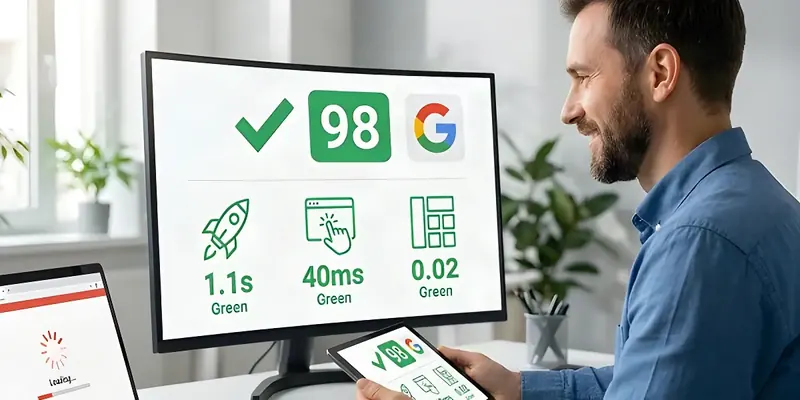
Core Web Vitals are the metrics Google uses to measure how using your website feels: LCP, the largest element loading in under 2.5 seconds; INP, responding to taps in under 200 milliseconds; and CLS, nothing jumping around while the page loads. Failing them can push you down in search results.
Imagine inviting a customer into your physical store, but the front door takes 10 seconds to open, the salesperson ignores their questions, and the shelves magically shift around while they try to grab a product. Would that customer buy anything? They’d probably run away.
That is exactly what Google evaluates on your website through Core Web Vitals.
At DapSite, we know that having a pretty website is no longer enough. That’s why our advanced support plans ensure that your site isn’t just loved by your customers, but also passes Google’s strict technical exam with a “Good” rating.
What are Core Web Vitals and why should you care?
Core Web Vitals are a set of metrics created by Google to measure “Page Experience.” They don’t measure what your site says, but how it feels to use it. If you fail these metrics, Google assumes your website is frustrating and will push it down in the search results.
These are the three key metrics your website must master, explained without developer jargon:
1. LCP (Largest Contentful Paint) – The Patience Test
It measures how long it takes for the largest element on your screen to appear (usually a main hero image or a giant headline).
- Google’s Rule: It must load in under 2.5 seconds. If it takes longer, the user will feel the website is “broken” and leave.
2. INP (Interaction to Next Paint) – The Reflex Test
It measures how quickly your website reacts when a user does something (like tapping a button, opening a menu, or adding a product to the cart).
- Google’s Rule: The response must be almost instant (under 200 milliseconds). Nobody likes clicking and waiting to see if the button actually worked.
3. CLS (Cumulative Layout Shift) – The Pulse Test
Have you ever gone to tap a link on your phone and, right before you press it, the page jumps and you end up tapping an ad by mistake? That is a poor CLS. It measures the visual stability of your site.
- Google’s Rule: Elements on your website shouldn’t push each other around while loading. Everything needs to stay exactly in its place.
How DapSite helps you get a “Good” rating
Optimizing Core Web Vitals isn’t something you achieve by installing a single magic tool. It requires deep tweaks to the code, the server, and the images.
At DapSite, we include Core Web Vitals monitoring and optimization in our Standard and Pro Plans. Here is how we do it:
| Core Web Vitals Problem | How DapSite Solves It |
|---|---|
| Giant images sinking your LCP | Automatic compression and next-gen formats (WebP). |
| Useless code blocking INP | JavaScript cleanup and delaying non-essential scripts. |
| Jumping fonts and buttons (Bad CLS) | Reserving exact spaces in the layout so nothing moves. |
| Slow server | We optimize caching and server response times so it flies. |
Conclusion: Speed is money
Every second your website takes to load or react, you are losing sales and rankings on Google. SEO is no longer just about keywords; it’s pure technical performance.
Have no idea what your website’s Google rating is?
Leave the technical frustration behind. With DapSite’s Standard or Pro Plans, we take control of your performance and guarantee a fast, stable, and optimized site to conquer both Google and your customers.
If your site is already slow to load, see how we speed up a slow website.
Frequently asked questions
What are Core Web Vitals and why should I care?
They're a set of metrics created by Google to measure page experience: they don't evaluate what your website says, but how it feels to use. If your site fails them, Google assumes it's frustrating and may push it down in search results, which means fewer visits and fewer customers reaching your business.
What numbers does my website need to pass?
By Google's rule, the largest element on the screen (LCP) should load in under 2.5 seconds, the response to an interaction like tapping a button (INP) should arrive in under 200 milliseconds, and elements shouldn't move around while the page loads (CLS). If any of them fails, visitors feel your site is slow or broken.
Is installing an optimization plugin enough to improve Core Web Vitals?
No. Optimizing them requires deep adjustments to code, server, and images: compressing images and serving them in modern formats like WebP, cleaning up JavaScript and delaying non-essential scripts, reserving the exact space for each element so nothing jumps, and improving caching and server response. DapSite's Standard and Pro plans include a Core Web Vitals promise with a “Good” rating.
What causes a poor CLS score?
It happens when the page jumps while loading: you go to tap a link on your phone and, right before you do, the content shifts and you end up tapping an ad by mistake. It's usually caused by fonts and buttons that move as the page loads. The fix is reserving the exact space for each element in the layout so everything stays put.