The “Rusty Swiss Army Knife”: Why Installing a Tool for Everything Can Weigh Down Your Website
Is your website overloaded with tools and integrations? Discover how unnecessary software can slow down your server, create security vulnerabilities, and how DapSite can clean up and optimize your website.

In short
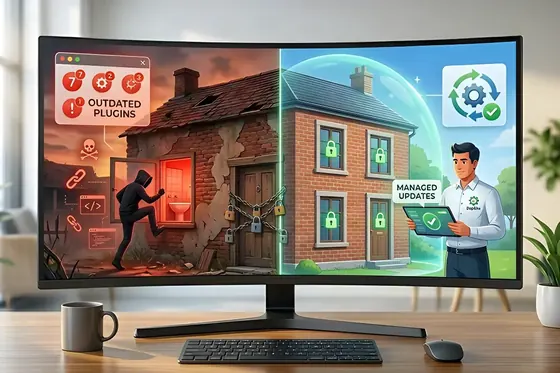
Installing a plugin for every small feature makes your website heavy, insecure and prone to failure: each one loads its own files, they can clash and break the shopping cart, and every outdated plugin is a door for attackers. It pays to audit, remove redundant tools and use lightweight custom code.
Imagine you buy a pocket Swiss Army knife. It’s brilliant: it has a blade, a screwdriver, and scissors. Very useful. But over time, you add a chainsaw, a hammer, a blowtorch, and a boat anchor to it.
Your “handy tool” now weighs 80 pounds, doesn’t fit in your pocket, is dangerous to handle, and when you try to use the blade, the scissors pop open and cut you.
In the website ecosystem, this kind of excessive accumulation of tools is often referred to as “Tool Bloat.”
At DapSite, one of the first steps we take when receiving a website with performance issues is to review its installed tools, integrations, and components. It’s common to find sites with dozens of unnecessary or inactive tools, many of them performing simple or redundant tasks. Here’s why this excess can slow down your server and affect your website’s performance.
The Illusion of “Free and Easy”
Websites are incredibly flexible because, for almost any function you need, there’s usually a tool or integration available. Want a WhatsApp button? There’s a tool for that. Want to change the menu color? There’s a tool for that. Want to see analytics? There’s a tool for that.
The problem is that many of these tools are developed by different teams, with little or no coordination between them.
The 3 Consequences of Tool Bloat
Installing tools and integrations without proper control can come at a high cost, affecting your website’s performance, security, and overall health:
1. The “Spaghetti Code” Collapse (Conflicts)
Every tool or integration can add its own CSS, JavaScript, and other resources. The more components your website loads, the more work the browser and server have to perform before displaying the page. As the number of third-party components grows, so does the risk of compatibility issues that can break essential functions, such as forms, navigation, or online purchases.
2. Massive Security Holes
Hackers can target vulnerable, poorly maintained, or abandoned website components and third-party integrations. Every additional component can introduce another potential security risk. Keeping unused or outdated software on your website increases its attack surface and can leave your business exposed.
3. Permanent Database “Junk”
Some tools and integrations store data in your website’s database. The problem is that uninstalling a component does not always remove all of the data it created. Over time, these leftover records can accumulate and contribute to database bloat, making your website harder to maintain and potentially affecting its performance.
Audit and Pruning: DapSite’s Technical Minimalism
Having a functional website doesn’t mean having it covered in “patches.” It means using the fewest tools to achieve the maximum results.
In DapSite Support Plans, we apply a strict diet to your infrastructure:
| Bad Practice | The Amateur Approach | DapSite’s Minimalism |
|---|---|---|
| Simple Functions | They install a heavy tool just to add a logo or insert Google Analytics code. | We use lightweight, optimized solutions to achieve the same result without overloading the website. |
| Code Quality | They add multiple third-party tools that perform the same or similar tasks. | We replace unnecessary tools with centralized, optimized solutions that keep the website clean and efficient. |
| Deep Cleaning | They leave unused tools and integrations taking up resources and creating potential vulnerabilities. | Monthly Audits. We remove redundant tools and clean up unnecessary files, code, and data from the website. |
Conclusion: Fewer Tools, More Speed
Your website should be a light, aerodynamic race car, not a moving truck overloaded with junk you don’t use.
Do you know exactly how many active tools you have on your Website right now?
If the number exceeds 20 or 25, your site is carrying dead weight. With a DapSite Support Plan, we audit your code, prune unnecessary tools, and consolidate your functions so your site flies without sacrificing features.
If you would rather have someone handle this for you, see our WordPress maintenance service.
Frequently asked questions
How many plugins are too many for my website?
A practical warning sign: if you have more than 20 or 25 active plugins, your site is probably carrying dead weight. More than the exact number, what matters is that each tool has a clear purpose, is up to date, and doesn't duplicate what another one already does. It's common to find sites with 50, 60, or even 80 plugins, many inactive or doing trivial tasks.
Why do so many plugins slow down my site?
Each plugin usually loads its own design (CSS) and interactivity (JavaScript) files. With 40 plugins, your customer's browser has to download and read 40 extra files before showing the page. On top of that, many leave leftovers in the database that the server loads uselessly on every visit, which makes everything slower.
Is it enough to deactivate the plugins I don't use?
No. A deactivated plugin still takes up space and can be a vulnerability if it isn't updated. The right move is to remove redundant tools completely and clean up the traces they left in the database, because when uninstalled they rarely delete their tables. A periodic audit helps you keep only what you really need.
How do I replace plugins without losing features?
For simple tasks, like adding the Google Analytics code or placing a logo, a small snippet of custom code does the same job without overloading the system. And when several free plugins each do the same thing halfway, it's better to replace them with a single well-optimized solution. That way your site gains speed without sacrificing features.
Sources
- Eliminate render-blocking resources – Lighthouse, Chrome for Developers (opens in a new tab) · developer.chrome.com
- Uninstall methods – Plugin Handbook, Developer.WordPress.org (opens in a new tab) · developer.wordpress.org
- A06:2021 – Vulnerable and Outdated Components – OWASP Top 10 (opens in a new tab) · top10.owasp.org