The “Spare Key in the Oven”: Why Your Cheap Hosting’s Backups Are an Illusion
Trusting your hosting’s free backups? Discover why local backups are a danger and how DapSite’s encrypted external cloud storage secures your business.

In short
Many cheap hosting plans store backups on the same drive as your website: if it fails, ransomware encrypts it or your account is suspended, you lose the site and the backup at once. A reliable backup is stored off the server in external cloud storage, is encrypted and is tested by restoring it.
In this article
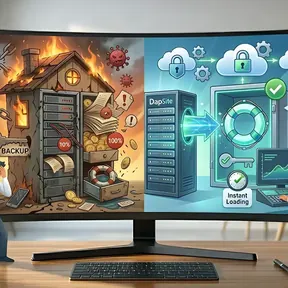
Imagine you are a cautious person and decide to make a copy of your house key in case of an emergency. But instead of giving that key to a trusted relative, you decide to keep it… inside your own kitchen’s oven.
One day, your house catches fire. You lose your home and, tragically, you also lose the spare key because it was inside.
In the website world, this is exactly what 90% of business owners do: they blindly trust the Local Backups given away by their cheap hosting provider. At DapSite, we’ve had to give the worst news to new clients: “Your web was hacked, the server crashed, and since your backup was on that same server, you’ve lost absolutely everything.” Here is why you need a true external security vault.
The “Free Backup” Trap
When you buy a cheap hosting plan, it almost always includes a magic button that says “Daily Backups.” What they don’t tell you in large print is where those copies are stored. By default, they are stored on the same hard drive where your website lives. It’s the digital equivalent of the key in the oven.
3 Disasters Where a Local Backup Won’t Save You
1. Hard Drive Collapse (Hardware Failure)
If the hosting company’s hard drive dies, your website disappears. And since the backup was stored on that same dead disk, there’s no way to recover it. Years of work evaporated in a second.
2. Data Hijacking (Ransomware)
If a hacker gets into your server, they won’t just infect your website. They will encrypt (lock) your entire file folder and ask for a Bitcoin ransom. If they get into the server, your backup will also be hijacked and locked.
3. “Excessive Consumption” Suspension
If your web overuses resources, your provider can suspend your account and block your access. Without access to your account, you have no access to the backups trapped inside.
How to check what backups your host makes
Before you trust the backup included in your plan, ask your provider these questions or look for the answers in its terms of service:
- How often does it back up your site, and how many days does it keep each copy?
- Does it store the copies on another server or on the same disk as your website?
- Can you download a full copy (files and database) whenever you want?
- Does it charge to restore a backup, or does a restore depend on a support ticket?
- What happens to the backups if it suspends your account?
If the answers aren't clear, assume the backup doesn't exist. And if instead of your host's backups you use a plugin that stores copies on your own server, the risk is similar: we explain it in The Lead Life Preserver.
Remote and External Backups: DapSite’s Armored Vault
A true safety net must be independent of the main structure. If the ship sinks, the lifeboats cannot be tied to the bottom of the hull.
| Situation | Hosting Backup (Key in the Oven) | DapSite Standard (Off-Site Backup) |
|---|---|---|
| Location | Stored on the same machine as the web. | External Cloud Storage. We send your copies to secure Amazon or Google servers. |
| Security | Simple and vulnerable compressed files. | Encrypted backups. If someone steals the copy, they won’t be able to read the data. |
| Verification | You never know if it works until you need it. | Restoration Testing. We constantly verify that the files actually work. |
Conclusion: Unlink Your Lifebuoy from Your Problem
Technical accidents and hacks are not a remote possibility; they are a statistical certainty. The question is not if your web will suffer a problem, but how fast you can restore it.
If your hosting provider disappeared tomorrow, would you have a copy of your website in your hands?
Do not leave years of work at the mercy of a cheap hard drive. With a DapSite Support Plan, we externalize and shield your backups, giving you absolute peace of mind.
If you would rather have someone handle this for you, see our WordPress maintenance service.
Frequently asked questions
Are my hosting provider's backups enough?
Usually not. Cheap hosting plans often include “daily backups,” but they don't make clear where those copies are kept: by default, on the same hard drive where your website lives. If that server fails, gets hacked, or your account is blocked, you lose your site and its backup at the same time.
What is an external or off-site backup?
It's a backup stored outside your website's server, for example in independent cloud storage. That way, if the original server is damaged, attacked, or disappears, the copy remains intact and you can restore your site. It's the same logic as a ship: the lifeboats can't be tied to the bottom of the hull.
How does an external backup protect against ransomware?
Ransomware encrypts the files on your server to demand a ransom. If your backups live on that same server, they get hijacked too. An external backup, stored somewhere else and also encrypted, remains available to restore your website, and even if someone stole it, they couldn't read the information.
How do I know my backup is actually usable?
With restoration tests. Often nobody knows whether a backup works until the day they need it, and sometimes it turns out to be corrupted. That's why copying isn't enough: you need to regularly verify that the files are valid and can be restored in an emergency. Every DapSite plan includes daily backups.