The Open Window: Why Outdated Tools Are a Hacker’s Favorite Entryway
Do you have outdated tools on your website? Discover why obsolete code is a hacker’s favorite entryway and how DapSite keeps your site armored.
In short
In most hacks, the attacker exploits a plugin or theme that wasn’t updated: bots crawl millions of sites that skipped the patch. An infected site can steal card details, redirect to scams or trigger a red Google warning. The answer is to keep updating, testing in staging and reviewing weekly.
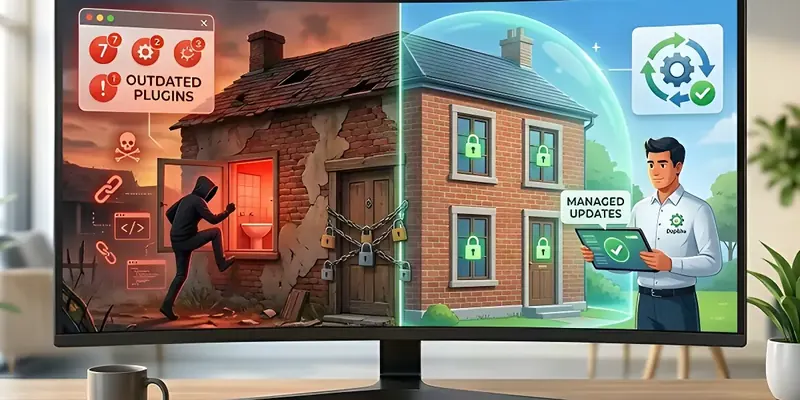
Imagine buying the most expensive armored door on the market for your business, installing security cameras, and hiring a guard. But, carelessly, you leave the bathroom window wide open every single night. No matter how much security you have at the front entrance, any rookie thief will know exactly where to sneak in.
On your website, that “open window” has a very specific name: Outdated Tools and Themes.
At DapSite, we clean dozens of infected websites every year from business owners who come to us looking for desperate help. 95% of the time, the hacker didn’t perform complex magic or guess impossible passwords; they simply exploited an obsolete tool that hadn’t been updated in months. Here is why ignoring that “Update” button is putting your entire business at risk.
The Life Cycle of a Vulnerability (How Hackers Think)
Website is wonderful because it is modular. If you want a contact form, you install a tool. If you want to sell online, you install a store tool. However, you must remember one fundamental fact: tools are lines of code written by humans, and humans make mistakes.
When a security flaw (a vulnerability) is discovered in a popular tool, this is what happens:
- The flaw is made public on cybersecurity forums.
- The creator of the tool releases an urgent update to patch that hole.
- Hackers program “bots” (automated robots) that crawl millions of websites looking for sites that have not installed that specific update.
If you don’t update, your website raises a digital red flag that says: “Hey, I have this unpatched security hole, come right in!”
The 3 Nightmares of an Obsolete Code Infection
When a hacker enters through an outdated tool, they rarely destroy your page. That isn’t profitable. Instead, they use it as a tool for their own illicit businesses, causing these three scenarios:
1. “Ghost Redirects”
You visit your website and everything looks normal. But when your customers try to enter from their phones or by clicking on Google, they are automatically redirected to gambling pages, questionable pill stores, or cryptocurrency scams. By the time you notice, you have already lost dozens of outraged customers.
2. Silent Data Theft
If you run an online store, the attacker can inject invisible code into your checkout page. Every time a legitimate customer enters their credit card to buy from you, the data is discreetly sent to the hacker’s server. Your company’s reputation will be ruined in an instant.
3. Google’s “Blacklist”
Google constantly scans the internet looking for infected sites to protect its users. If they detect malware hidden on your site by an obsolete tool, they will put up a giant red warning screen before anyone can enter your site that reads: “The site ahead contains malware.” Furthermore, your corporate emails will start landing straight in your clients’ Spam folders.
DapSite’s Patch Management: Security Without Breaking Your Site
Many business owners avoid updating out of fear. They know that clicking “Update All” can cause incompatibilities and break their page (as we saw in our article on live changes).
It is a dead-end for a beginner: if you don’t update, you get hacked; if you update blindly, you break the site. At DapSite, we break this cycle with the Patch Management included in our Support Plans:
| Action | The Amateur Method | The DapSite Method |
|---|---|---|
| Monitoring | Ignoring the red warning bubbles on the Website dashboard. | We monitor global vulnerability databases in real-time. |
| Update Process | Clicking “Update” and crossing your fingers. | We update tools in a secure environment (Staging), verify the design doesn’t break, and then apply it to your live site. |
| Frequency | Once a year, or whenever you remember. | Rigorous weekly reviews to keep all “windows” locked tight. |
Conclusion: Digital Hygiene is Not Optional
Running an online business requires continuous maintenance. Thinking you can build a website, leave it abandoned for a year, and expect it to remain secure is a dangerous fantasy.
How many “Update Available” notifications do you have on your dashboard right now?
Each one of those notifications is an open window. Leave security and maintenance in the hands of professionals. With a DapSite Support Plan, we keep your website’s code polished, updated, and armored against intruders, ensuring your digital business never becomes a victim.
If you would rather have someone handle this for you, see our WordPress maintenance service.
Frequently asked questions
Why are outdated plugins so dangerous?
Because tools are code written by humans, and humans make mistakes. When a vulnerability is discovered, it's made public and the creator releases an update to patch it; from then on, automated bots crawl millions of sites looking for the ones that didn't update. If your site still runs the old version, it's like leaving a window open for attackers.
How can I tell if my site was hacked through an old plugin?
It isn't always obvious, because attackers want everything to look normal. Some signs: your customers get redirected to gambling or scam pages when they visit from their phones or from Google; Google shows a red malicious-software warning before people enter your site; or your business emails start landing in spam folders.
If I update everything at once, can I break my website?
Yes, and that's why many business owners don't update. It's a dead end: if you don't update, you can get hacked; if you update without a method, you can break the page. The safe way is to apply updates first in a test environment (staging), check that the design doesn't break, and then roll them out to the live site.
How often should I check for updates?
Frequently, not once a year or whenever you happen to remember. The best practice is rigorous weekly reviews that keep every “window” on your site shut and locked. Every DapSite plan includes weekly platform updates, security patching, and proactive protection against threats.
Sources
- A06:2021 – Vulnerable and Outdated Components – OWASP Top 10 (opens in a new tab) · top10.owasp.org
- Hardening WordPress – Advanced Administration Handbook, Developer.WordPress.org (opens in a new tab) · developer.wordpress.org
- Spam policies for Google web search – Google Search Central (opens in a new tab) · developers.google.com